Building a Smart Bug Triage System with LLMs and Vector Search
2026-03-09 6 mins
A deep dive into building an AI-powered bug triage system using embeddings, vector search, and LLM reasoning to automatically analyze bugs, retrieve historical context, and suggest fixes.
Table of Content
Smart Bug Triage: Building an AI-Powered Triage Assistant
Modern engineering teams spend a surprising amount of time triaging bugs rather than fixing them.
Understanding the issue, searching historical tickets, identifying the right team, and proposing possible fixes can easily consume hours.
This post describes a Proof of Concept (PoC) for a Smart Bug Triage System that automates this process using LLMs, embeddings, and vector search.
The goal was simple:
When a bug is created, automatically analyze it, search historical issues, and suggest the most likely solution and responsible team.
The Problem with Traditional Bug Triage
In large engineering organizations, bug triage typically involves:
- Reading the bug description
- Searching similar historical issues
- Understanding context from documentation
- Identifying the correct team
- Suggesting potential fixes
This process is manual, repetitive, and inconsistent.
Engineers often rediscover solutions that already exist in past issues or documentation.
The idea behind this PoC was to build a system that can reuse organizational knowledge automatically.
High-Level Idea
The system uses retrieval augmented generation (RAG) to analyze new bugs.
Instead of relying purely on the LLM, it retrieves relevant historical data first and then uses the LLM to generate insights.
The pipeline looks like this:
- Extract bug data
- Search historical issues using vector embeddings
- Feed relevant context to the LLM
- Generate an explanation and recommended action
- Post the result directly to the bug work item
Architecture Overview
Below is the overall workflow of the system.
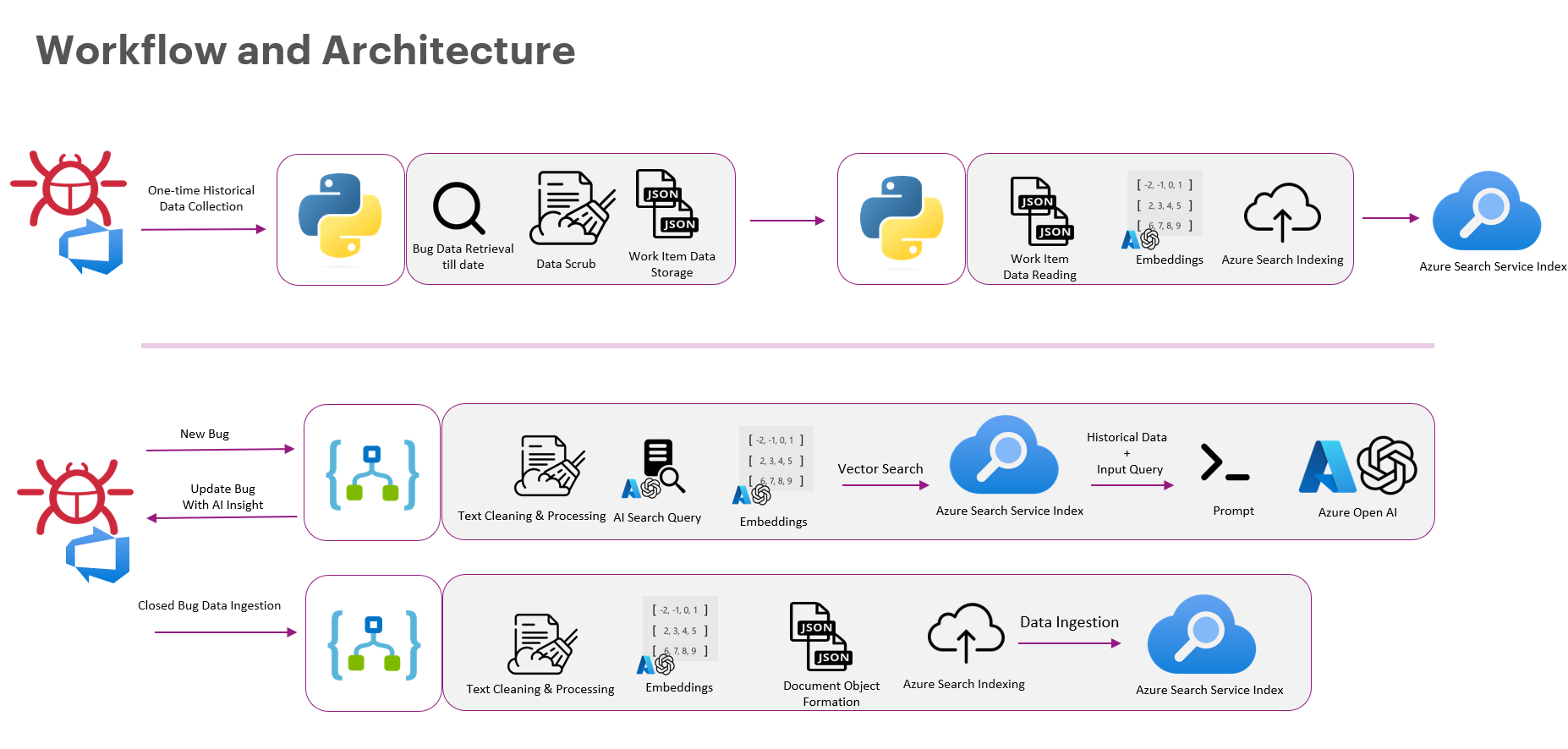
The system has three major components:
- Historical Data Pipeline
- Bug Analysis Pipeline
- Continuous Learning Loop
Step 1 — Building the Historical Knowledge Base
The first step was to collect historical bug data.
We extracted data from the issue tracking system and processed:
- bug titles
- descriptions
- comments
- resolution notes
- metadata
The pipeline looked like this:
- Retrieve historical work items
- Clean and normalize text
- Generate embeddings
- Store them in a vector index
These embeddings allow the system to search semantically, not just by keywords.
So even if the wording differs, the system can still find similar issues.
Step 2 — Smart Bug Analysis
When a new bug is created, the system triggers the analysis pipeline.
The process:
- Extract bug details
- Clean and preprocess text
- Generate embeddings
- Perform vector search on historical data
- Retrieve relevant issues
- Send context to the LLM
The LLM then produces:
- likely root cause
- possible solutions
- suggested responsible team
The system automatically posts the analysis back to the bug ticket.
AI Automation Workflow
The core AI pipeline looks like this:
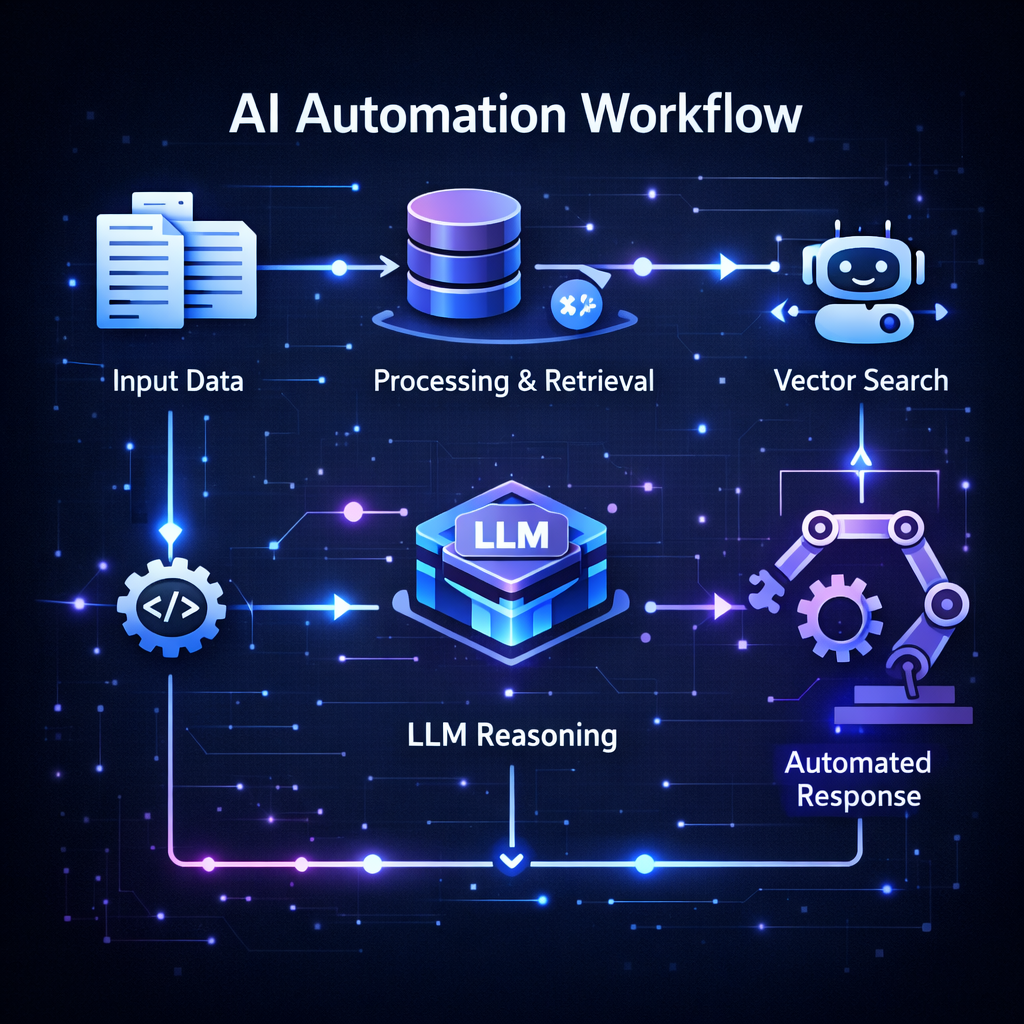
The steps include:
Input Data
Bug description and metadata are collected.Processing & Retrieval
Relevant historical bugs are retrieved via vector search.LLM Reasoning
The model analyzes the context and generates insights.Automated Response
Suggestions are posted back to the bug tracker.
Continuous Learning
One key part of the system is the feedback loop.
When a bug is resolved:
- The final resolution is captured.
- The data is cleaned and embedded.
- It is added back to the vector index.
This means the system continuously improves as more bugs are resolved.
Over time it becomes a knowledge engine for debugging.
Why This Works
This approach works well because it combines:
- Historical knowledge retrieval
- LLM reasoning
- Automation within developer workflows
Instead of asking engineers to search documentation, the system brings the knowledge to them.
Impact
Even as a PoC, the system demonstrated strong potential benefits:
- Faster bug triage
- Reduced manual investigation
- Better reuse of historical solutions
- Improved routing of issues to the correct teams
In large organizations, where thousands of bugs are filed, this can significantly improve developer productivity.
Future Improvements
Some exciting directions for this system include:
- Integrating log analysis
- Incorporating code-level context
- Using real-time monitoring signals
- Building confidence scoring for suggestions
Ultimately, the goal is to move toward AI-assisted debugging systems.
Final Thoughts
Bug triage is one of those tasks that engineers accept as unavoidable.
But with the combination of vector search, LLMs, and automation, much of that effort can be dramatically reduced.
Smart triage systems like this can transform bug tracking systems from simple issue lists into intelligent debugging assistants.
And this is just the beginning.